In November 2024, Anthropic released Model Context Protocol — an open standard for connecting AI systems to external tools, data sources, and APIs. Nine months later, Claude, Cursor, Zed, and dozens of other AI clients support it. The integration ecosystem is growing faster than most developers realise.
MCP is not a product. It is a specification — a common language that lets AI clients and tool providers talk to each other without custom integrations. If you have ever built a Slack integration for every app separately and wondered why there is no universal standard, MCP is the answer for AI tools.
What is MCP?
Model Context Protocol (MCP) is an open standard that defines how AI systems (clients) discover and call tools, data sources, and APIs (servers). It was developed by Anthropic and released as an open specification in November 2024.
Before MCP, connecting an AI assistant to a tool meant writing a custom integration for every combination of AI client and tool. Claude with your database: custom integration. Cursor with your Jira: custom integration. Every new AI client or tool added to the matrix required a new integration. The combinatorial explosion made maintaining AI integrations expensive and fragmented.
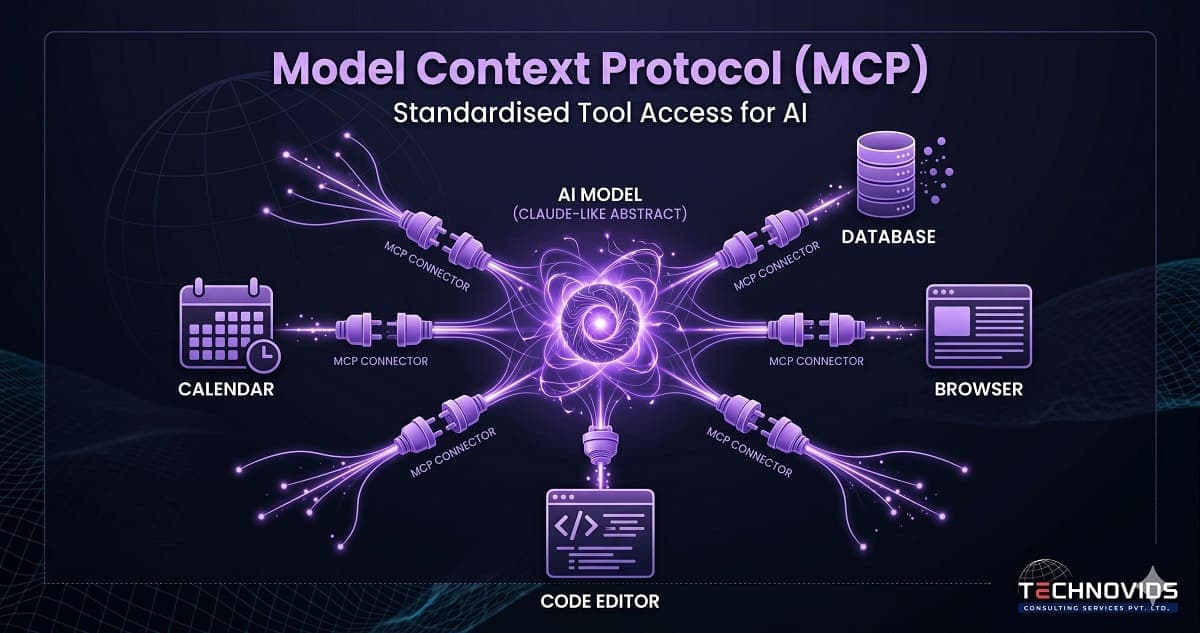
MCP solves this by defining a standard protocol. An MCP server exposes tools in a standardised format. An MCP client — any AI system that speaks the protocol — can discover what tools are available and call them without knowing anything about the underlying implementation. Build your tool as an MCP server once; it works with every MCP-compatible AI client.
Why Anthropic Built MCP
The technical motivation is straightforward: as AI systems become more capable and agentic, they need to interact with the real world. Answering questions from training data is one thing; taking actions in enterprise software systems is another. A reliable, secure, standardised way for AI systems to access tools is a prerequisite for trustworthy AI agents.
The strategic motivation is also clear: by open-sourcing the protocol and making it implementation-agnostic, Anthropic positioned MCP as infrastructure rather than product. When Google, Microsoft, and OpenAI adopted the standard (or announced compatibility), the ecosystem grew exponentially. MCP is now closer to an industry standard than a proprietary Anthropic feature.
For enterprise software teams in India, the implication is significant. AI clients your company uses — Claude, Cursor, Copilot, and the next generation of AI-powered IDEs and assistants — will increasingly support MCP. Teams that know how to build MCP servers can expose any internal tool, database, or API to AI clients without waiting for a vendor to build the integration.
How MCP Works: Servers, Clients, and Hosts
MCP has three components:
MCP Server: A process that exposes tools, resources, and prompts through the MCP protocol. A tool might be "search the product catalogue," "query the customer database," "send a Slack message," or "run a SQL query." The server handles authentication, input validation, and execution. It returns results in a standardised format.
MCP Client: The AI application — Claude desktop, Cursor, a custom AI agent — that connects to MCP servers, discovers available tools, and calls them when the AI decides they are needed. The client handles tool selection (usually by the LLM reasoning about which tool matches the task) and result integration into the conversation context.
MCP Host: The environment that manages connections between clients and servers. In Claude Desktop, the host is the application itself. In a custom AI agent, the host is your orchestration code — LangGraph, for instance, acting as the host that manages MCP connections.
The communication happens over two transport mechanisms: stdio (for local servers running as subprocesses) and HTTP with Server-Sent Events (for remote servers). The JSON-RPC-based message format is simple enough that a competent Python developer can build a working MCP server in a few hours.
MCP vs Traditional API Integrations
The comparison people reach for first: why not just give the AI access to REST APIs? Tool calling with OpenAI and Anthropic already supports this — you define a function schema and the LLM calls it.
The difference is discoverability and standardisation. With tool calling over a REST API, the developer defines the schema manually and the LLM learns about the tool from the schema. With MCP, the server declares its capabilities using a standard protocol, and any MCP-compatible client can discover and use them without manual schema definition. This scales in a way that tool-by-tool manual integration does not.
The second difference is ecosystem leverage. A tool exposed as an MCP server works with every MCP client — today and in the future. A tool wired directly to one AI system requires new work for every new client. For teams building internal tooling that multiple AI applications will use, MCP is the obvious architecture.
What You Can Build with MCP
- Internal knowledge base connector: An MCP server that queries your Confluence or Notion workspace, allowing any AI client to search your company knowledge base with natural language.
- Database query tool: An MCP server that safely exposes read-only SQL queries against your production database, with permission controls and query validation built in.
- CRM integration: An MCP server that wraps your Salesforce or HubSpot API, letting AI assistants look up customer records, log activities, and update deal stages.
- Code execution sandbox: An MCP server that runs Python or SQL in a sandboxed environment, allowing AI coding assistants to test code snippets safely.
- Internal API gateway: A single MCP server that proxies multiple internal microservices, presenting them as a unified tool surface to AI clients.
MCP in Indian Enterprise Software
Indian enterprise teams are at an early-mover advantage with MCP. Most large enterprises globally are still in the "custom integration for each tool" phase. Teams that build MCP-native tool surfaces now will have a reusable, maintainable, client-agnostic AI integration layer — rather than a growing pile of one-off integrations that break every time an AI vendor changes its API.
The skill gap is real: fewer than 1% of Indian AI engineers have built an MCP server. This means the developers who learn it now are entering a space with almost no competition and rapidly growing demand.
Building Your First MCP Server
Anthropic's official Python SDK makes building an MCP server straightforward. The minimal structure: install the MCP Python SDK, define your tools using the decorator-based API, and run the server. Tools declare their name, description (which the LLM uses to decide when to call them), and input schema. The SDK handles the protocol layer.
Prerequisites: solid Python skills, some familiarity with async Python, and a basic understanding of how tool calling works in LLM applications. MCP server development is not the place to start your AI engineering journey — it is Stage 5 of 6 on the AI engineering roadmap.
MCP is covered in Module 5 of our Production AI Engineering corporate training — the most advanced module, deliberately placed last because it builds on RAG and agent foundations. Participants build a complete MCP server exposing internal data to Claude and a custom LangGraph agent by the end of the programme.